
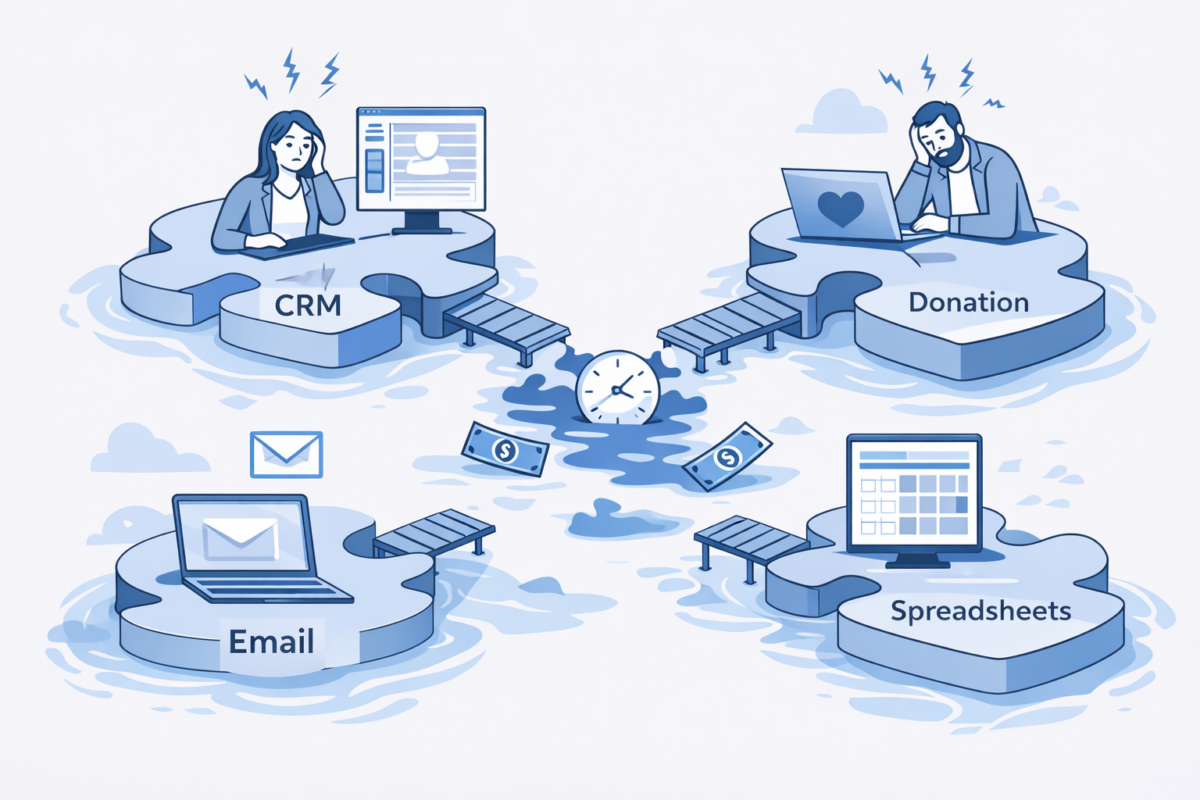
Your development director enters a donation into DonorPerfect. Then she opens Mailchimp and manually adds the donor’s email. Then she updates a Google Sheet for the board report. Then she creates a task in Asana to send a thank-you letter.
Four systems. One donation. Fifteen minutes of manual work.
Multiply that by every donation, every new volunteer, every event registration, and every program participant. Those minutes add up fast.
After working with nonprofits for 15+ years, I can tell you with certainty: disconnected systems are one of the biggest silent budget drains in the nonprofit sector.
Most organizations know their systems don’t talk to each other. What they don’t realize is exactly how much this is costing them—in time, money, accuracy, and missed opportunities.
Let’s break down the real cost of disconnected systems and, more importantly, how to fix it.
The Hidden Costs of Disconnected Systems
1. Staff Time (Your Biggest Expense)
The Problem:
When your systems don’t communicate, your team becomes the integration layer. They manually move data between platforms, reconcile information, and create workarounds.
The Math:
- Small nonprofit (2-3 staff): 10-15 hours/week in manual data work
- Medium nonprofit (5-10 staff): 20-30 hours/week
- Larger nonprofit (10+ staff): 40+ hours/week
At an average fully-loaded staff cost of $35/hour:
- Small nonprofit: $18,200-$27,300/year
- Medium nonprofit: $36,400-$54,600/year
- Larger nonprofit: $72,800+/year
That’s salary you’re paying for copy-paste work instead of mission work.
2. Data Errors and Inconsistencies
The Problem:
When you enter the same information multiple times, errors creep in. A typo here, an outdated address there, a missed update somewhere else.
The Real Impact:
- Duplicate donor records leading to duplicate appeals
- Bounced emails from outdated addresses
- Inaccurate reports for board meetings and grant applications
- Donors receiving wrong acknowledgment amounts
- Missed opportunities because someone “fell through the cracks”
The Cost:
One major donor offended by a duplicate appeal or wrong acknowledgment letter can cost thousands in lost revenue. One inaccurate grant report can jeopardize funding.
3. Missed Opportunities
The Problem:
When data lives in separate silos, you can’t see the complete picture of your supporters’ engagement.
What You’re Missing:
- The donor who also volunteers (perfect major gift prospect)
- The email subscriber who attended three events (ready for deeper engagement)
- The volunteer who hasn’t donated (might respond to the right ask)
- Patterns in giving that could inform your fundraising strategy
- Early warning signs that a donor is disengaging
The Cost:
Research shows that integrated data can increase donor retention by 15-25% and volunteer-to-donor conversion by 30-40%. For a nonprofit raising $500K annually, that’s $75K-$125K in additional revenue.
4. Decision-Making in the Dark
The Problem:
Your CRM says one thing. Your email platform says another. Your spreadsheets tell a third story. Which one is right?
The Impact:
- Board reports take days to compile instead of minutes
- Strategic decisions based on incomplete or inaccurate data
- Inability to answer simple questions like “How many active supporters do we have?”
- Grant applications delayed because you can’t quickly pull the data
- No clear ROI on your technology investments
5. Technology Frustration and Burnout
The Problem:
Staff spend their days fighting with technology instead of focusing on your mission.
The Human Cost:
- Reduced job satisfaction
- Increased turnover
- Difficulty attracting top talent
- “Death by a thousand clicks” syndrome
- Technology decision paralysis (afraid to make it worse)
The Financial Cost:
Replacing a nonprofit employee typically costs 50-150% of their annual salary. If disconnected systems contribute to even one departure every few years, that’s tens of thousands in recruitment and training costs.
Real Example: The Multiplication Effect
Let me share a real scenario from a client (details changed for privacy):
The Situation:
A health services nonprofit with a $2M budget was using:
- Salesforce for donor management
- Mailchimp for email marketing
- WordPress with GiveWP for online donations
- QuickBooks for accounting
- Google Sheets for program tracking
- Eventbrite for event registration
None of these systems talked to each other.
What We Discovered:
- 25 hours/week in manual data entry across 4 staff members
- 15% duplicate donor records
- Average 3-4 day delay in donation acknowledgments
- Board reports took 2 full days to compile each month
- No way to track donor engagement across channels
The Annual Cost:
- Staff time: $45,500
- Estimated lost revenue from poor acknowledgment timing: $15,000
- Estimated lost revenue from inability to segment and target donors: $30,000
- Staff frustration and turnover risk: Immeasurable
Total measurable cost: $90,500/year
For a $2M budget, that’s 4.5% of their annual budget literally disappearing into the gap between their systems.
The Most Common Disconnected System Scenarios
Scenario 1: The CRM-Email Gap
The Setup:
Donor database (Salesforce, DonorPerfect, Bloomerang) separate from email marketing platform (Mailchimp, Constant Contact).
The Problem:
- New donors added to CRM but not email lists
- Email engagement data not visible in CRM
- Can’t segment emails based on donation history
- Unsubscribes in email platform don’t sync to CRM
The Fix:
Direct integration or middleware like Zapier to sync contacts, donation data, and engagement metrics bidirectionally.
Scenario 2: The Donation-Accounting Disconnect
The Setup:
Online donation platform separate from accounting software.
The Problem:
- Monthly reconciliation takes hours
- Errors in revenue reporting
- Delayed financial statements
- Manual creation of receipts for accounting
The Fix:
Automated sync of donation transactions to accounting software with proper categorization and matching.
Scenario 3: The Volunteer-Donor Divide
The Setup:
Volunteer management system separate from donor database.
The Problem:
- Can’t identify volunteers who are also donors
- Miss opportunities to cultivate volunteer donors
- Duplicate communications
- Incomplete supporter profiles
The Fix:
Unified system or integration that creates complete supporter records showing all engagement types.
Scenario 4: The Event Registration Island
The Setup:
Event management platform (Eventbrite, GiveButter) disconnected from everything else.
The Problem:
- Event attendees not automatically added to CRM
- Can’t track event attendance as part of engagement scoring
- Manual follow-up processes
- Revenue tracking separated from donor records
The Fix:
Integration that creates/updates donor records from event registrations and syncs attendance data.
Scenario 5: The Spreadsheet Web
The Setup:
Critical data lives in Google Sheets or Excel because systems can’t do what you need.
The Problem:
- Information not accessible to everyone who needs it
- Version control nightmares
- Broken formulas and accidental deletions
- Data that should trigger actions just sits there
The Fix:
Either bring spreadsheet data into your main systems or use tools that can read/write to spreadsheets programmatically.
How Integration Fixes These Problems
When systems are properly integrated, magic happens:
Instead of This:
- Donation comes in through website
- Development director receives email notification
- Manually enters donation into CRM
- Manually adds donor to email list
- Manually creates accounting entry
- Manually updates board report spreadsheet
- Manually triggers thank-you letter
- Hopes everything matches up
You Get This:
- Donation comes in through website
- Automatically creates/updates donor record in CRM
- Automatically syncs to accounting software
- Automatically adds to appropriate email segments
- Automatically updates reporting dashboards
- Automatically triggers personalized thank-you email
- Automatically creates task for major gift follow-up (if threshold met)
Time saved: 15 minutes per donation
Accuracy: 100% consistent across systems
Opportunity: Major gift prospects automatically flagged
Integration Options: From Simple to Sophisticated
Option 1: Native Integrations (Easiest)
Many platforms offer built-in integrations with popular tools.
Pros:
- Usually easiest to set up
- Typically most reliable
- Often included in your subscription
Cons:
- Limited to what the vendor supports
- May not sync everything you need
- Less customizable
Example:
Mailchimp’s native Salesforce integration for basic contact syncing.
Option 2: Middleware Platforms (Most Common)
Services like Zapier, Make (formerly Integromat), or Tray.io connect different applications.
Pros:
- Connects thousands of apps
- No coding required (usually)
- Fast to implement
- Good for straightforward data flows
Cons:
- Monthly subscription costs
- Limited to what the platform supports
- Can get expensive with high volumes
- May need multiple “zaps” for complex workflows
Cost: $20-300/month depending on volume and complexity
Example:
When someone registers for an event in Eventbrite, automatically create/update their record in Salesforce and add them to a specific email campaign in Mailchimp.
Option 3: Custom Integration (Most Powerful)
Purpose-built integration developed specifically for your needs.
Pros:
- Exactly what you need
- Can handle complex logic
- More reliable for critical workflows
- Owned by you, not dependent on third-party service
Cons:
- Higher upfront cost
- Requires developer expertise
- Ongoing maintenance needed
Cost: $2,000-15,000 depending on complexity
When You Need This:
- Native and middleware options don’t meet your needs
- You have unique workflows
- Data transformation required
- High transaction volumes
- Mission-critical integration
Example:
Our QuickBooks-to-Salesforce integration that syncs donation data nightly with complex mapping rules and handles scenarios that off-the-shelf tools can’t.
Option 4: Unified Platform (Nuclear Option)
Replace multiple systems with one integrated platform.
Pros:
- No integration needed
- Everything in one place
- Consistent interface
Cons:
- Major undertaking
- Significant change management
- May sacrifice best-of-breed tools
- Higher risk if it doesn’t work out
When This Makes Sense:
- Starting fresh
- Current systems are truly terrible
- You’re very small and simple needs
- You’ve tried integration and it failed
How to Decide What to Integrate First
You can’t integrate everything at once. Here’s how to prioritize:
High Priority (Do These First)
1. Donation Platform → CRM
Every donation should automatically update your donor records.
2. CRM → Email Marketing
Your donor data should drive your email segmentation.
3. Donation Platform → Accounting
Revenue recognition shouldn’t require manual entry.
Medium Priority (Do These Next)
4. Event Registration → CRM
Capture attendee data automatically.
5. Website Forms → CRM
Contact form submissions, newsletter signups, volunteer applications.
6. Volunteer Management → CRM
Create complete supporter profiles.
Lower Priority (Nice to Have)
7. Social Media → CRM
Track engagement metrics if relevant to your strategy.
8. Survey Tools → CRM
Capture feedback and preferences.
9. Program Management → CRM
Track service delivery alongside fundraising.
DIY vs. Hire Help: What Can You Do Yourself?
You Can Probably DIY:
- Simple Zapier integrations (2-3 steps)
- Native integrations with good documentation
- Connecting tools you already know well
- Testing and experimentation
Consider Professional Help When:
- Integration involves financial data (high stakes)
- You need bidirectional sync (data flowing both ways)
- Complex logic or data transformation required
- High-volume transactions
- Mission-critical integration (donor acknowledgments, etc.)
- You’ve tried and it’s not working
- Your time is better spent on mission work
Pro Tip: Start with a small pilot integration to prove the concept before tackling everything.
What Good Integration Looks Like
Here’s what you should experience after implementing proper integration:
✅ Data Entry Once: Information entered in one system appears everywhere it’s needed
✅ Automatic Updates: Changes in one system automatically update related records elsewhere
✅ Complete Profiles: See the full supporter journey (donor, volunteer, event attendee) in one place
✅ Real-Time Reporting: Dashboards that update automatically, not manually compiled
✅ Triggered Actions: Donations over $X automatically create major gift follow-up tasks
✅ Accurate Segmentation: Email lists that update automatically based on donor behavior
✅ Time Saved: Hours returned to your team each week for mission work
✅ Better Decisions: Reports you can trust because data is consistent
Common Integration Mistakes to Avoid
Mistake 1: Integrating Bad Data
Clean your data BEFORE integration, or you’ll just spread the mess faster.
Mistake 2: Over-Integrating
More integrations isn’t always better. Only integrate what provides real value.
Mistake 3: No Testing
Always test with a small data set before going live with real donor data.
Mistake 4: Ignoring Error Handling
Integrations break. Have a plan for monitoring and fixing issues.
Mistake 5: No Documentation
Six months later, no one remembers how the integration works or what it does.
Your Next Steps
If you’re dealing with disconnected systems, here’s your action plan:
This Week:
- Calculate your cost – How many hours per week does your team spend on manual data work?
- Identify your biggest pain point – Which disconnected systems cause the most problems?
- Research options – What native integrations or middleware tools are available?
This Month:
- Start small – Pick ONE integration that would save the most time
- Get stakeholder buy-in – Show the math on time and cost savings
- Test the concept – Try a simple integration to prove the value
This Quarter:
- Implement priority integrations – Focus on high-impact connections first
- Document everything – Make sure your team knows how it works
- Measure the results – Track time saved and improvements
The Bottom Line
Disconnected systems are costing your nonprofit thousands of dollars per year in:
- Wasted staff time
- Data errors and duplicates
- Missed fundraising opportunities
- Poor decision-making
- Staff frustration
The good news? Integration technology has never been more accessible or affordable. From simple Zapier connections to custom integrations, there are solutions for every budget and technical skill level.
The question isn’t whether you can afford to integrate your systems.
It’s whether you can afford not to.
Free System Integration Assessment
Not sure where to start with integration?
Schedule a free 30-minute assessment and we’ll:
- Review your current systems and workflows
- Identify your highest-impact integration opportunities
- Provide specific recommendations and estimated costs
- Show you examples from similar nonprofits
No sales pitch—just honest advice about whether integration makes sense for your situation.
Download the System Integration ROI Calculator (Excel)
Next week: Real-world case study: How one organization saved 25 hours per week by integrating QuickBooks with Salesforce
